
Restore/Replace not present in Source-Connect 4
This article contains troubleshooting informationRestore/Replace not present
Source-Connect | Version 4 | All Operating Systems
Description
When users finish a recording session and either navigate to the Restore/Replace screen or manually upload a file, they see a message saying “Restore/Replace not present” for the audio file.
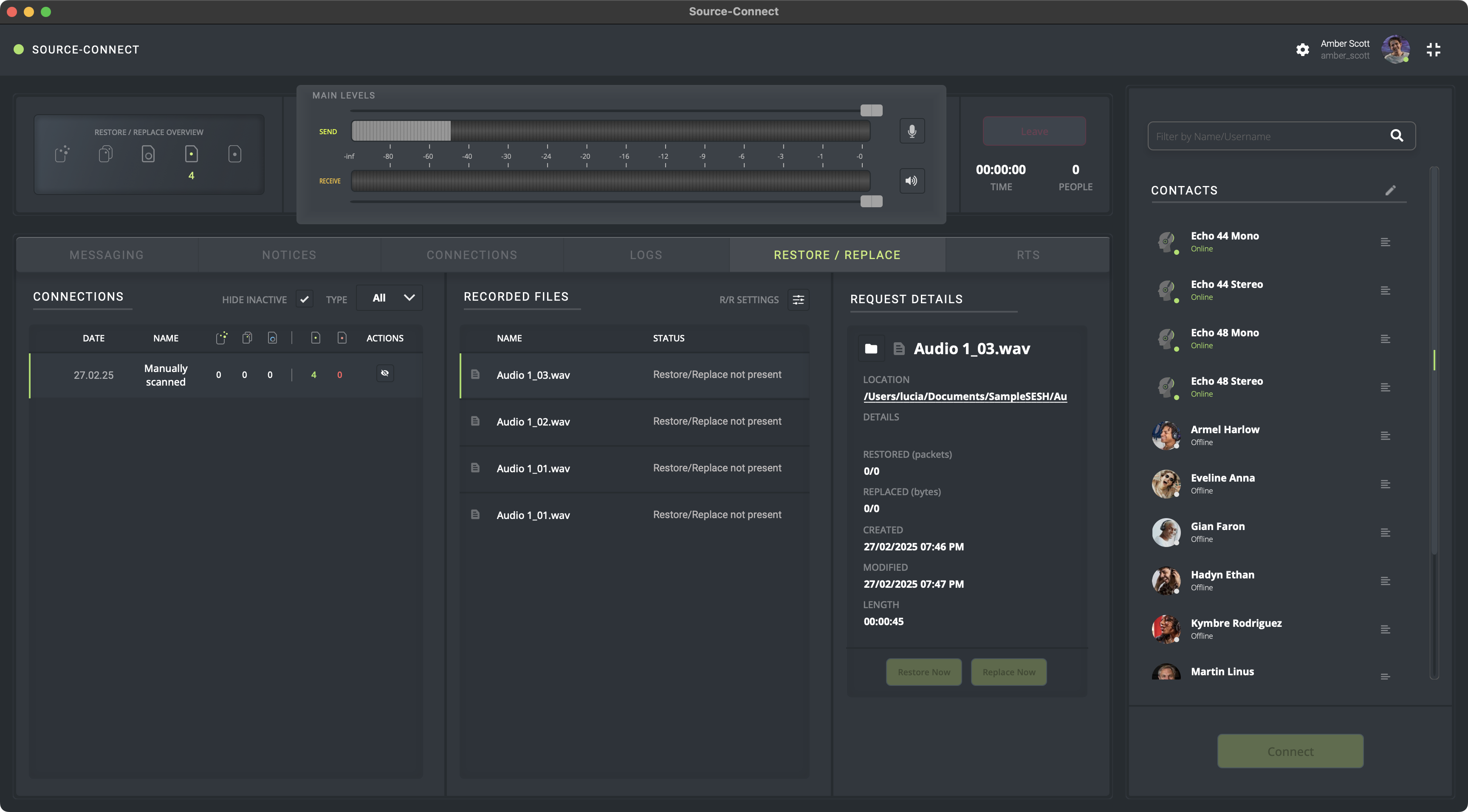
Reason
The audio files were not recorded with Source-Connect - either the recording party has not recorded the session, or they made a mistake with their routing.
This might also happen when the Restore/Replace signature is not present in the file. Most of the times, this might be caused by a different level than the original signal caused by a send or fader not set to 0, or an effect/processing in the signal's path. If any processing or changes takes place, Restore/Replace fails to recognize the file's signature.
Actions
Unfortunately, there is no workaround for this error message. It is for that reason that we recommend a quick Restore/Replace test before conducting a session. You will need to repeat the session again; make sure the recording party toggles the “Restore” and “Replace” sliders on in their Source-Connect application, and double check the routing in your DAW.
If you believe you got this error message by mistake, or you need help with routing, please contact support at [email protected].
Table of Contents