
Authorization Required in Source-Nexus Suite
This article contains troubleshooting informationAuthorization Required: Source-Nexus Suite
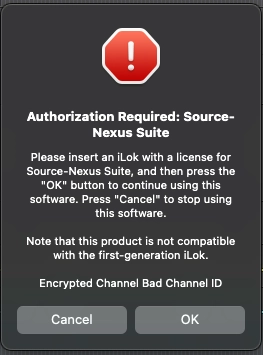
Please insert an iLok with a license for Source-Nexus Suite, and then press the "OK" button to continue using this software. Press "Cancel" to stop using this software.
Note that this product is not compatible with the first-generation iLok.
Encrypted Channel Bad Channel ID
Source-Nexus Suite | All Versions | All Operating Systems
Description
When users try adding any of the Source-Nexus Suite products in a DAW, they see the following error message:
Reason
The software cannot reliably use the license on the connected iLok USB. This can happen when the iLok is not compatible with the computer or its USB connection is unstable.
Actions
Use iLok License Manager to move the license to another valid activation location. The locations permitted for a license are shown in its Valid Locations column.
- Make sure you have the latest version of iLok License Manager installed. If not, update it before trying the other steps.
- If host-computer activation is available, move the license from the iLok USB to the computer running Source-Nexus Suite.
- If iLok Cloud is available for the license, open an iLok Cloud session in iLok License Manager (File > Open Cloud Session). iLok Cloud requires a continuous internet connection and is only available for licenses that the publisher has enabled for iLok Cloud.
- Try a different or replacement iLok USB if you need to use a physical iLok. Connect it directly to the computer where possible, or use a powered USB hub.
If the error continues, please contact our support team for assistance.
Table of Contents