
ProTools Audio processing deadline not met error with Source-Nexus Mute-On
"Audio processing deadline was not met. This may have been caused by the following plugin: Plugin: Source-Nexus Mute-On"
ProTools | Source-Nexus Mute-On | Windows / macOS
Description
This error occurs in Pro Tools when the Source-Nexus Mute-On plugin cannot process audio within the required time constraints. The full error message displays:
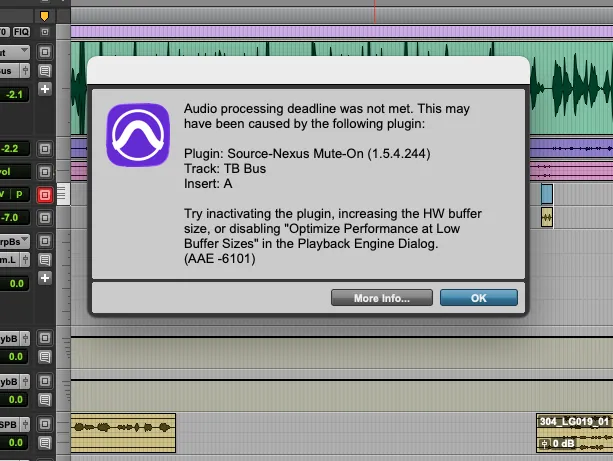
Cause
This error occurs when Pro Tools' audio processing engine cannot complete its calculations within the allocated buffer time. Common causes include:
- Buffer size set too low for the current system load
- CPU overload from multiple plugins or processes
- "Optimize Performance at Low Buffer Sizes" setting causing processing conflicts
- Hardware buffer and software buffer size mismatch
- System resources being consumed by other applications
Actions
Try these solutions in order to resolve the AAE -6101 error:
1. Adjust Buffer Settings
- In Pro Tools, go to Setup > Playback Engine
- Increase the H/W Buffer Size to a higher value (try 512 or 1024 samples)
- Click OK and test playback
2. Disable Low Buffer Size Optimization
- In the Playback Engine dialog, find the "Optimize Performance at Low Buffer Sizes" option
- Uncheck this option
- Click OK and test playback
If the issue persists after trying these solutions, please contact Source Elements Support with:
- Your Pro Tools version
- Source-Nexus Mute-On version number
- Current buffer size settings
- System specifications (OS, CPU, RAM)
Table of Contents