
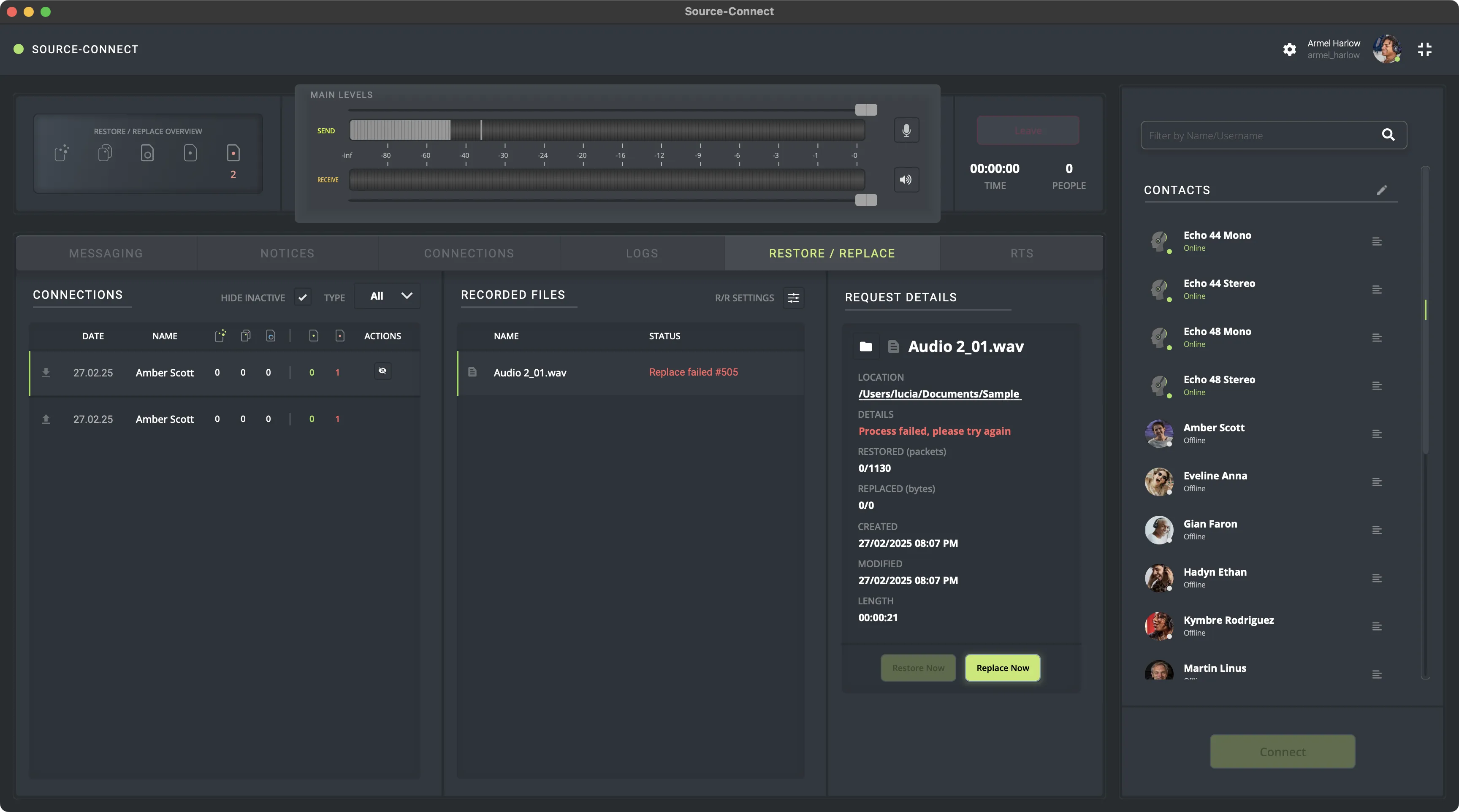
ERROR#505: Process failed, please try again
This article contains troubleshooting informationERROR#505: Process failed, please try again
Source-Connect | Version 4 | All Operating Systems
Description
When users start a Restore/Replace session, they get an error message saying the process failed and they should try again.
Reason
There was an error when processing the files for the restore/replace process. The most common reason usually is that your connection partner is offline - they will need to be online for the process to complete.
This might also occur for users whose connections are behind a firewall.
Actions
In order to fix this issue, try the following:
- If your connection partner is offline, please ask them to log back in so you can complete the Restore/Replace process.
- Try replacing and restoring again if your connection partner was always already online.
- If you have an active firewall (on Windows or Mac), an anti-virus (Kaspersky, Avast, etc), or other protection software (McAfee, Norton, Malwarebytes, etc), try disabling them, if possible.
- If you are on Windows, add a Windows firewall rule to allow Source-Connect through, and do the same for every "protection" software.
If the problem persists, contact Support. You might need a document which allows you to configure network firewalls and ensure Source-Connect 4 operates without network-related issues.
Table of Contents